Data API: letting another system read your table
Export → Export Data Api gives each table an HTTP endpoint, a workspace key and a ready-made curl command. Scripts, other systems and BI tools fetch it on demand and always get the current data, freshly computed formula columns included.
What it solves
An exported file is a snapshot, once. The Data API turns a table into an endpoint: an outside program GETs it whenever it likes and receives the data as it is at that moment, freshly computed formula columns included. Good for:
- A script of your own fetching data on a schedule
- Another system (an ERP, a mini-app backend) reading master data you maintain in TableDI
- A reporting tool connecting directly
It sits on the paid feature list as API out.
Turning it on
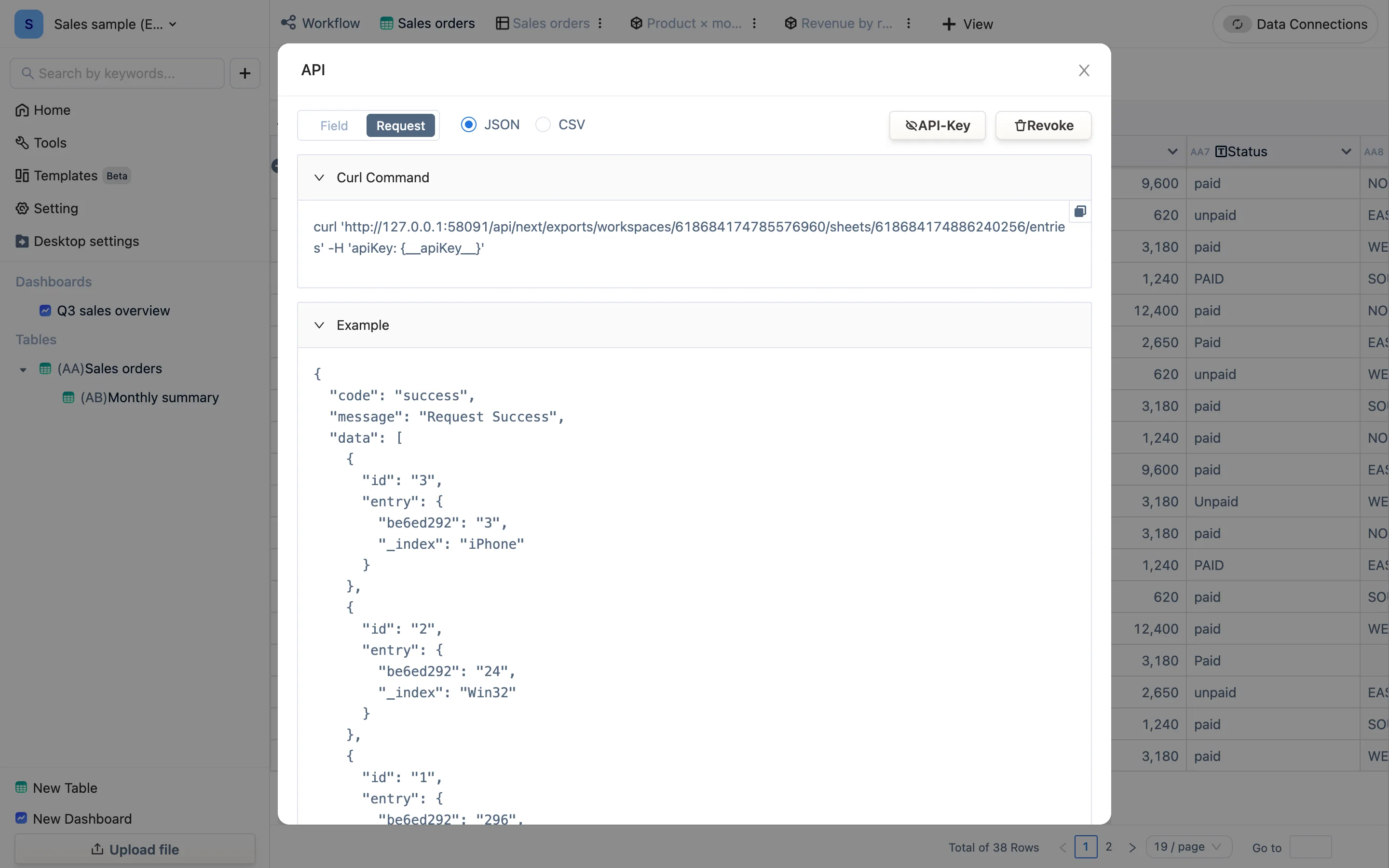
- Open the table, Export → Export Data Api. A dialog titled API opens.
- Two tabs. Field lists every column of this table — its id, its code (AA1, AA2…), its title, its formula and its type. Request gives you a Curl Command you can paste straight out and an Example response, with a JSON / CSV switch at the top for the format.
- The API-Key button at the top right controls whether the key is shown inside the example. The key belongs to the workspace (on the team edition a project can have its own API-Key), so tables in one workspace share it. Run the command from the other system, with the key in an
apiKeyrequest header.
The command looks like this:
curl 'http://127.0.0.1:58091/api/next/exports/workspaces/<workspaceId>/sheets/<sheetId>/entries' -H 'apiKey: <your key>'Replacing the key
If a key leaks or somebody leaves, press Revoke. The confirmation asks The old API will become inaccessible. Do you want to replace it? — confirm and every call using the old key fails immediately; update them to the new one. The address does not change.
What comes back
- Every row and column of the table, with the current values of formula columns. The shape is
{"code":"success","data":[{"id":"37","entry":{…}}]}— oneentryper row. - The keys inside
entryare column ids (hex strings like59048da8), not column titles. The index column is always_index, and there are two submission fields,submit_atandsubmit_by. - The id-to-title mapping is what the Field tab is for. Renaming a column does not change its id, so reading by id is the stable choice — and never read by position.
Where the desktop app stops
The desktop engine runs only on your computer, so the endpoint is reachable from that machine alone (note the 127.0.0.1 in the curl command). Nothing on the wider network can reach it. To let other systems in your company read it, use the team edition, whose endpoint lives in the cloud.
The other direction
Letting an outside system write in is an HTTP connection acting as a server, under Data Connections, or automation. The Data API is read-only.