A table is organized by column — fields, codes and rows
A table here behaves more like a database table than an Excel canvas: each column is one kind of data, with a type and a code; each row is one record. Understand this and the formulas, views and linked tables all follow.
One column, one kind of data
In Excel any cell can hold anything: a title, a note, a number, a merged block. Not here — one column holds one kind of data. Amount is all numbers, Date is all dates, Region is all text.
Two things follow directly:
- The header is always the first row, and there is only one of it. There is no "a couple of title rows, then a blank line, then the headers".
- Merged cells do not exist. The import preview has Merge Rows, Merge Fields and Auto Merge Rows precisely so you can stitch a two-row header into one before it comes in.
It feels restrictive for a day or two, and then you notice what it buys: formulas that apply to a whole column, views you can create freely, and tables that link to each other. None of that is possible on a canvas.
Columns have a type
Each column has one Field Type, which decides how it is stored, how it displays and what it can take part in:
| Type | Used for |
|---|---|
| Text | The default. Names, reference numbers, notes |
| Numeric | Decimal places, thousands separators, units. Only this type sums or averages |
| Percent | 1 = 100%, 0.5 = 50% |
| Checkbox | Yes / no |
| Date | Year-month-day, or with a time |
| Dropdown | Pick from preset options, each of which can be colored |
| Attachments & Media | Hang a file on the row |
| QR Code | Renders this column's contents as a QR code |
Eight types, chosen from Field Type in the header dropdown. (The Attachments editor also has an Action switch — that is a sub-option of the attachment type, not a ninth type.)
Types are guessed once from the contents at import. When the guess is wrong, fix it here. The most common miss is an amount column read as text — if a sum comes out as 0, look here first.
Column codes
Every table gets a two-letter code (AA, AB, AC… in creation order), and every column has a number within the table. Together they make the column code: AA2 is the second column of table AA.
AA1 is always the # primary key column, maintained by the system; your first real column starts at AA2.
The code sits at the top-left of each header. It matters because formulas reference the code, not the name and not the position:
- Rename "Amount" to "Order amount" and every formula referencing it is untouched.
- Drag the column somewhere else and formulas still work.
- Cross-table references are just as simple: write
AA6inside table AB and you have the sixth column of table AA.
The Excel accident where "someone inserted a column and every VLOOKUP shifted" has no way to happen here.
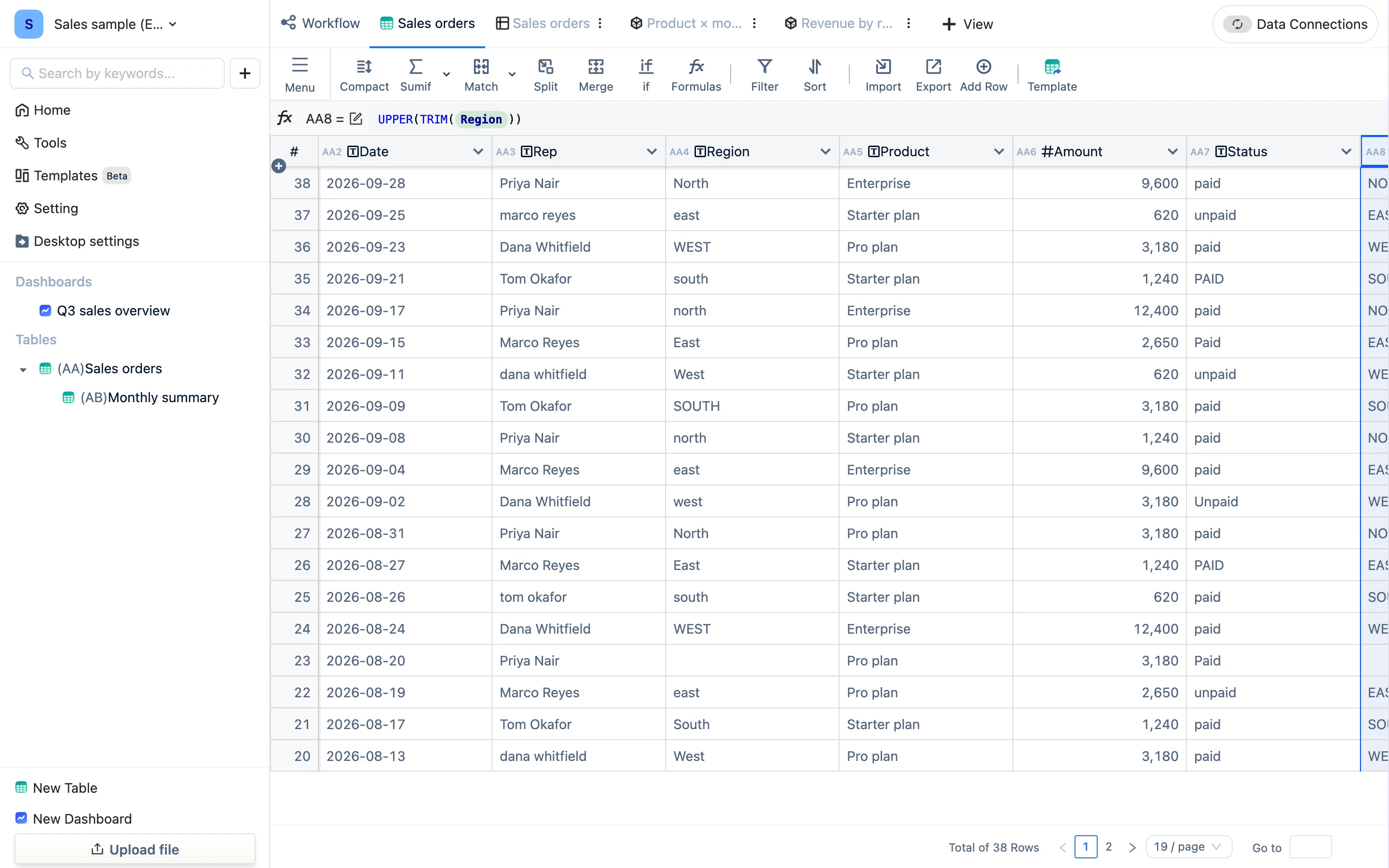
A row is one record
Rows carry no meaning beyond being records. New data lands at the top, so opening a table always shows the most recent additions first. To see them in another order, sort in a view — that changes the display, never the data.
Because a row is just a record, "the amount in row 5" is not a thing you can reference. Formulas describe relationships between columns, and hold equally for every row. Which is exactly the next page: a formula belongs to a column.